DNV defect images label processing
Proposed steps to label the DNV image dataset
- Separate video with MSA label from the rest of other video. We will need to figure out a way to handle these videos separately.
- For now, we will remove any frame that come after MSA label and frames with MSA and MCU (camera underwater) labels.
- Remove the first frame of each video because it is a blank frame.
- FH (End of survey) is not a part of the PACP condition code. (Please do not be confused with FH2, FH3, and FH4, which are used to describe Fracture longitudinal Hinge 2,3,4). For now Remove all rows that contain FH.
- Fix the distance column of the CSV file of rows where there is no observation.
- Check for an image with a value greater than the distance of the last image, NaN, or missing a value.
- Get the distance value from the closest image (difference between two row numbers) with the correct distance value that comes before the current image.
- Get the distance value from the closest image (difference between two row numbers) with the correct distance value that comes after the current image.
- Count the number of rows from the current image to the two images.
- Set the distance value of the current image the same as the image with a smaller difference between two row numbers.
- If the number of rows is equal, find average between the two distance value and report distance in one decimal place.
- Fix the distance column of the CSV file of rows where there is an observation
- Search for the closest image (smallest difference between row number of current image and the image) in both directions (images before and after the current image). Get the distance value from the closet image that has the same observation label.
- Find the distance that has an observation label. For each distance and label pair, images with the distance value will be labelled as their corresponding label.
- In case there is more than one label per distance. All labels will be included.
- There will be an additional step between steps 5 and 6 to label images within the distance of the observation label.
- for example, if the label is annotated at distance 3.8. Will need to do spatial correlation between image at 3.8 and image within - 0.5 distance of 3.8m
- Images with distances that have been labelled as MWL or other PACP codes related to water level will also have a label of non-defect (ND) if no other defect or observation is presented.
- The remaining images with no label will be labelled as non-defect (ND).
Clean up abnormal observation and distance gotten from Google Vision
Link to notebook The notebook is created to clean up abnormal observation and distance gotten from Google Vision
- Need to clean up the wrong observation labels that got from Google vision API
- Create the dictionary of all the known defect of the video
- Need to include
FH(End of Survey) in the dictionary (added on Oct 27) - REGEX needs to be enhanced to handle observation text nuances
- Google vision API detect
TB (TapasTBCTap. If we follow the dictionary rule set in OCR notebook, the output will beTBCand notTB. We will need to write a function to handle this. Suggestion: use mode to get label that likely to happen at the given rows with label within certain number of row.
- Need to clean up the abnormal distance labels obtained from Google vision API
- replace distance that is greater than the end of survey distance with np.nan
- replace the distance of the current row with np.nan if the difference between the two values is greater than 6 (video SANMN04254_44 has a big jump in distance from 0 to 3.1m. Therefore the difference will need to increase from 2 to greater than 3.1m. 6 was chosen because the distance between the two frames should within 5 m) (change on Oct 27)
- replace values where next row is less than the current row with np.nan
- call function look_backward and look_forward to replace distance value with np.nan with distance value of the closet row or the average between backward and forward distance if the number of row is equal.
- There is a problem with all_frame_SANMN04254_44 csv file that need to be checked. All the distance column is labeled as 0m.video SANMN04254_44 has a big jump in distance from 0 to 3.1m. Therefore the difference will need to increase from 2 to greater than 3.1m. 6 was chosen because the distance between the two frames should within 5 m
- Create a function to get the distance where the label is entered, the label, and the name of the frame that the label is first entered at. This will be needed for the plot_spatial_correlation.
Proposed methods to improve image label using the labelled distance and spatial correlation
Observations
From my observation, I believe that when the inspector detect the defect, they will move the camera to the point with defect and look around the defect. Then, they will move the camera back to the straight position where the camera is pointing to the center of the pipe (the distance will not decrease when they move the camera back. The distance will either remain the same or increase) before they enter the observation.
There are three types of frames when the observation (defect) is present:
frame where camera is pointing to the center of the pipe before the observation is labelled by the inspector (distance < the labelled distance).
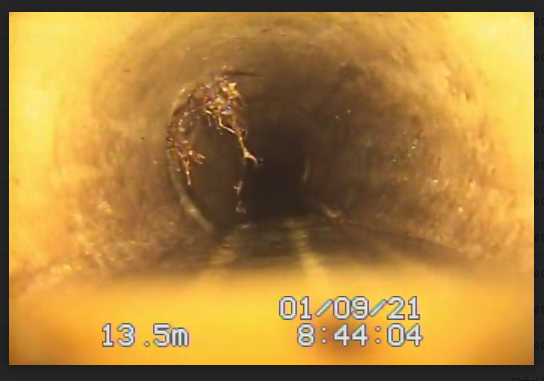
frame where camera is moving around the defect area (the camera is not pointing toward the center of the pipe).
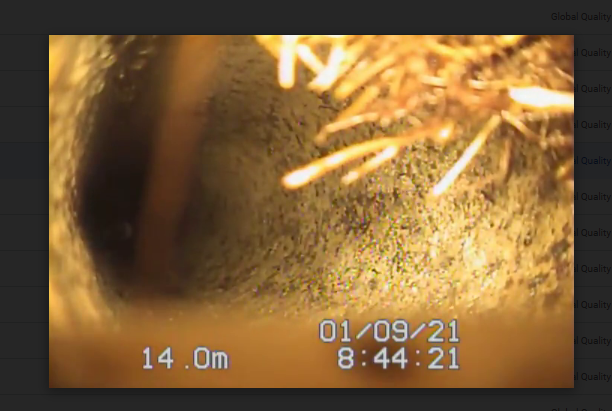
frame where camera is moving back from the defect area and pointing to the center of the pipe (distance == labelled distance >= distance from step 2).
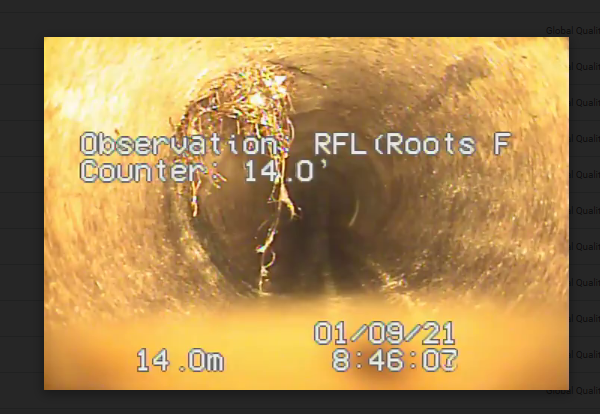
When there are more than one label at the same location, the number of frames from the frame where the observation is input to the frames where the observation is first seen will be varied because each label is input one at the time. For example, frame 1 is the first frame we see tap break root. Frame 10 is the first frame where tap break is entered and Frame 15 is the fist frame where root is entered. If we are going to write a code by looking back number of frame from the first labelled frame, we will need to take this into account. It might be better to do it in term of distance than the number of frame.
Suggested Methods
- Current implementation. Images get labelled if they have the same distance as the labelled frame.
- Images get labelled if they have the same distance as and have high correlation (>= 0.9) with the labelled frame.This would be a problem to the frames that captured during the look around. The "look around" frame will have a low correlation with the labelled frame.
- Images that get labelled if they have different distance but within a certain number of frame (or distance) away from the labelled frame and have high correlation (>=0.9) with the labelled frame.
Proposed steps on how to handle images that got mislabelled
- SewerML can be used to help with initial labelling
- SewerML performs well in predicting images with root and tap break.
- Implement the three suggested methods to improve image labelling process. Find the best method out of the three.
- Write a script to organize the images according to their labels.
- Use show_image() to determine whether the images are labelled correctly.
- Move the images that are labelled incorrectly to the correct label folder.
Current Image labels processing algorithms
link to the create_image_labels_v2 notebook
According to annotation on the video
- Read csv file obtained from running CCTV OCR video Processor v2 with Azure.ipynb
- Run the prepocessing function to clean up the data
- Remove the first frame that is usually a blank frame (black image)
- Remove the value in the 'labelAbbr' column has a value if the 'observation' column is empty.
- Replace the value in the 'distance' and 'counter' column if it is not a number (i.e. date format) with nan
- Rename 'frame_id' as 'fname' so that it is consistent with the fastai_multi_labels script
- Create an extra column named 'labels'. This column and 'fname' are the two columns necessary to run fastai script
- Make sure that values in the distance and counter columns are less than or equal to the end of survey distance. Replace the value that does not meet the condition with nan. This will be dealed with later in the distance interpolation step.
- Drop all frames that have 'FH' (end of survey) in 'labelAbbr' column and the frames that come after if 'FH' is presented in the dataset
- Drop all frames that have 'MSA' (survey is abandon) in 'labelAbbr' column and the frames that come after if 'FH' is presented. The distance where the first 'MSA' appear is recorded for later use.
- The distance between the two frames should not be greater than x meter. In our case, we use 6 m [edited Dec 17 2022. clean_row_with_dist_incr_grt_num(df,num=4)]. Replace the value with nan if the condition is met. This function is used to catch mistake by Azure's output where 1.4 was seen as 14.
- Replace the value in the 'distance' column with nan if the value is decreasing from the previous value.
- Dec 08, 2022: propose to remove this function because this problem is a glitch in video. We do not want to replace distance of frame with defect with nan because it was lesser than the previous value.
- Instead of this function, we should drop frames within 1 m distance before the point defect and at the start of continuous defect and any frames located between frames with that has distance = defect distance -1m and frame with defect labels to ensure that those frames would not be labeled as ND if they are located near defect points.
- Round the distance to the nearest one decimal place to enure that distance 16.0 and 16.00 are seen as the same key distance when we create distance and label dictionary.
- Create a dictionary of distances and their corresponding labels.
- Extra steps will be inserted here to deal with access database and continuous defect
- Remove MWL (Water level) from the dictionary when we are doing multi labels and not water estimation model
- Note: Water estimation model might be useful when we try to determine the water level sag (MWLS)
- Remove other codes that not related to defect
- MGO (General Observation)
- MGP (General Photograph)
- MY (Dye Test)
- MYV (Dye Visible)
- MYN (Dye Not Visible)
- Other code such as 'MCU' (camera underwater) is not excluded because we can use to exclude those frames from our training because most of the time defects were not seen.
- Do distance interpolation for frames with nan value in 'distance' column.
- Assign labels to image
- Treat defect label as point defect
- Assign labels based on distance label dictionary. Only assign label to frame that have the same distance as the observation label (store as a key in the dictionary)
- Assign labels based on spatial correlation
- Get list of defects with their frame names for each counter distance
- Record the name of the first frame for each counter distance
- For each first frame, grab list of frames that have distance: (counter distance -1) <= distance <= counter distance
- Calculate the spatial correlations of the selected first frame and the frames in the list
- Label each frame in the list with the list of defects if the spatial correlation is higher than a threshold (0.98)
- Label the rest of the frames in the list as 'drop'
- Repeat for other first frame in the list
- Extra steps will be added for continuous defect
- Assign labels to other non-label frames
- Get list of frames that do have values in 'labels' column.
- Assign labels to other frame as ND if frames do have distance values within x (1) distance from label counter distance.
- Assign labels as 'drop' if frames have distance values within x (1) distance from label counter distance.
- Treat defect label as point defect
- Drop frames that have the same distance as MSA distance recording in step 2.8 and do not have any value in 'labels' column.
- Drop frames that MCU in the 'labels' column.
- Remove frames that 'drop' in the 'labels' column.
- Add image extension (e.g: '.png') to the 'fname' column. This column will be used in fastai script.
- Save dataframe as csv. This csv will be used in fastai script.
Access Database and continuous Defect
- Export Access Database to excel files. The table includes:
- Video_Name
- Distance
- PACP_Code
- Continous
- Extra:
- Value_1st
- Value_2nd
- Value_Percent
- Clean up the table. Make sure the names in the 'Video_Name' column are the same as the video file names
- Create a point defect dictionary
- The annotation in the video and access database can be different. We should go with Access Database because the codes were likely to be reviewed before exporting to access database.
- The access database always begins with two defect codes (code related to Access Point, and MWL) at 0.0 m. Get rid of these two rows from access database as the first initial step.
- There are four scenarios:
- Use the counter column of the csv file to match with distance column from the access database if both csv file and access database have a matching distance.
- Discard the counter distance in csv file if csv file has defect label at distance that access database does not have.
- Add the new distance key to the dictionary if there is distance with defect label in the access database but csv file does not have.
- How to find the first frame of this new distance key?
- Get list of frame with that distance
- Select the frame in the middle as the first frame of that label (This frame will be used when doing spatial correlation)
- How to find the first frame of this new distance key?
- Get rid of labels that have the same distance as downstream (ending) access point.
- Any defects associated with manhole are coded in MACP and not in PACP.
- If we have a defect that has the same distance as the access point, it is likely to be the ending distance of the continuous defect. We will deal with this in the next step.
- There are four scenarios:
- Create a list of continuous defect for each video
- Columns: Defect code, Start Distance, and End Distance.
- Get list of rows in access database that contain 'S' in the 'continuous' col. Sort the list in alphabetical order based on values in 'continuous' col.
- Assign the value in 'PACP_Code' col to 'Defect code' col of the new dataframe.
- Assign the value in 'Distance' col to 'Start Distance' col of the dataframe.
- Get list of rows in access database that contain 'F' in the 'continuous' col. Sort the list in alphabetical order based on values in 'continuous' col.
- Assign the value in 'Distance' col to 'End Distance' col of the dataframe.
- Check if the End Distance is equal to the distance of the last access point if it has one.
- Subtract the ending distance by -1 m and assign this to the 'End Distance' col if the distance is the same as the distance of the last access point (usually manhole).
- After the image is assign based on high spatial correlation, apply algorithms to deal with continuous defects.
- Iterate through the list of continuous defect
- Get list of images that have values in the 'distance' col between Start Distance and End Distance and do not have the word 'drop' in the 'labels' col
- Add the defect label from continuous defect dataframe to the 'labels' col of each image if the label does not already exist.
- Repeat for other defect in the list.
- Different Scenarios to deal with continuous defects:
- The defect start (S) and end (F) without having other defects in between the Sn and Fn row (Satisfied by Step 5)
- There are other defects between Sn and Fn row (Satisfied by Step 5)
- The continue defect ends at Access point (eg: AOC, AMH) (Satisfied by Step 4.6 and 5)
- Other defect codes should not be presented in images that got labeled as Access point.
- MWL (water level) is between Sn and Fn row
- Low water level MWL < 50 (Satisfied by Step 5)
- High water level (MWL >= 50)
- If the water level is high, the camera is not able to show a perspective view.
- Not sure if we should discard those frame.
Example of Images got labelled according to Access database and issues with current image labelling implementation using access database
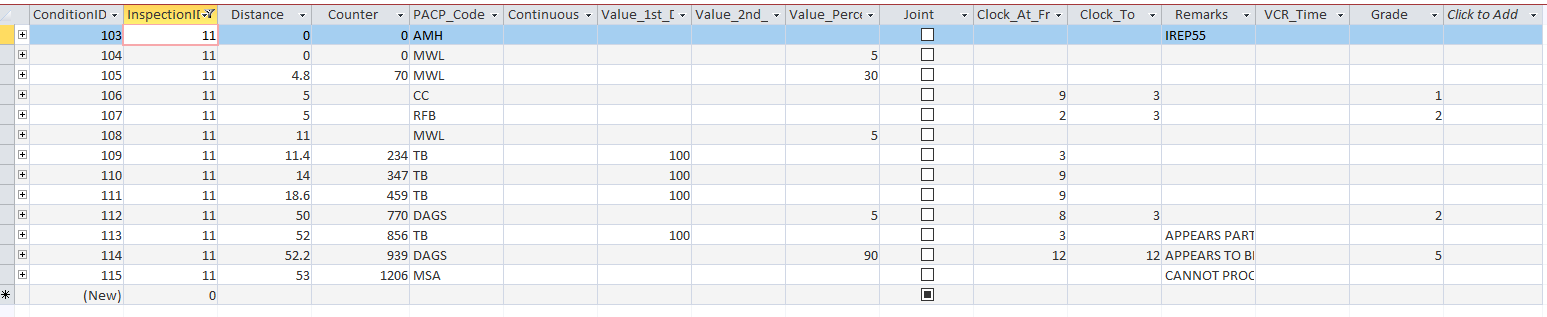
The frame was not annotated with any defect. However, in access database, the reviewer added two defects (CC and RFB) at 5.0m. The current image labelling process using access database was able to capture image with Crack Circumferential (CC) and Root Fine Ball (RFB) correctly.
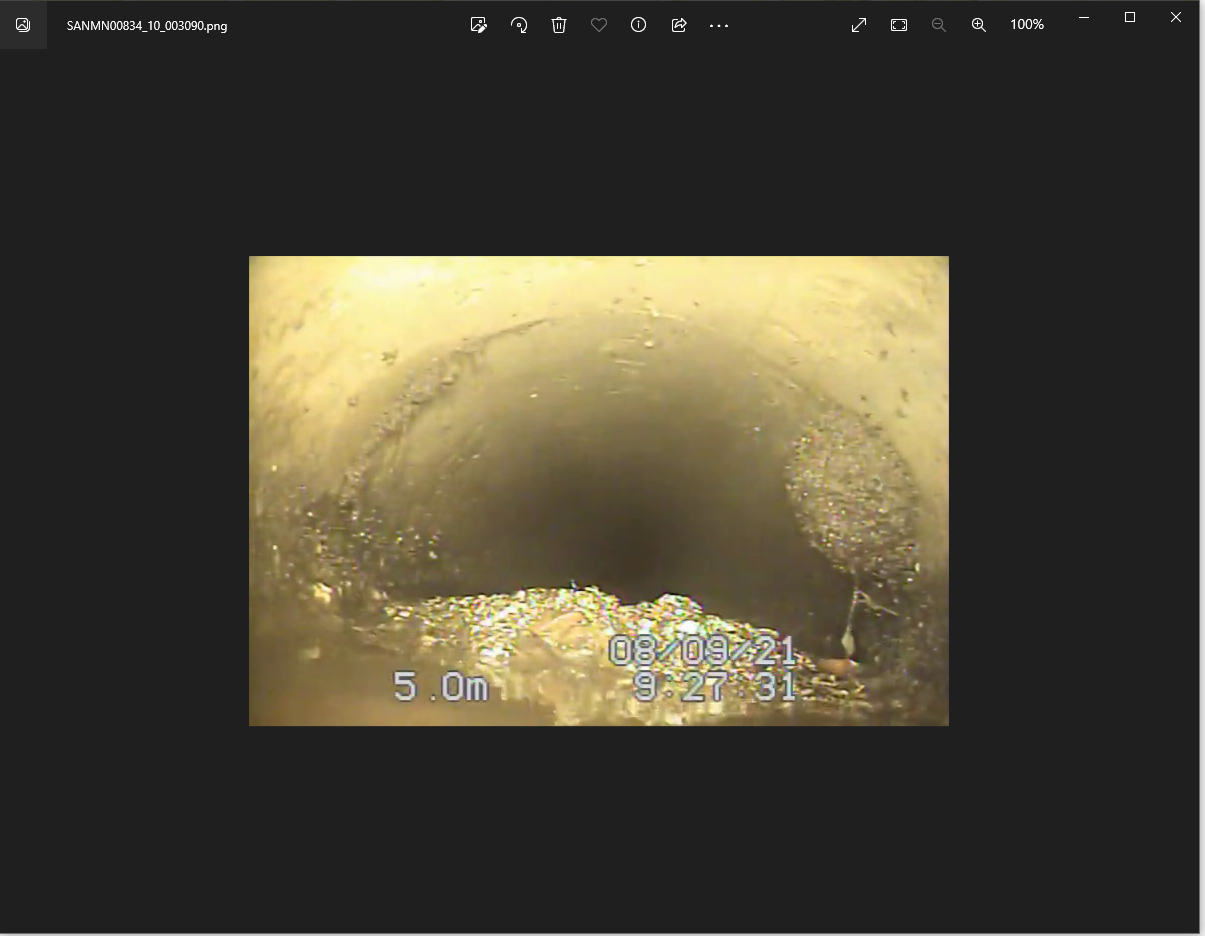
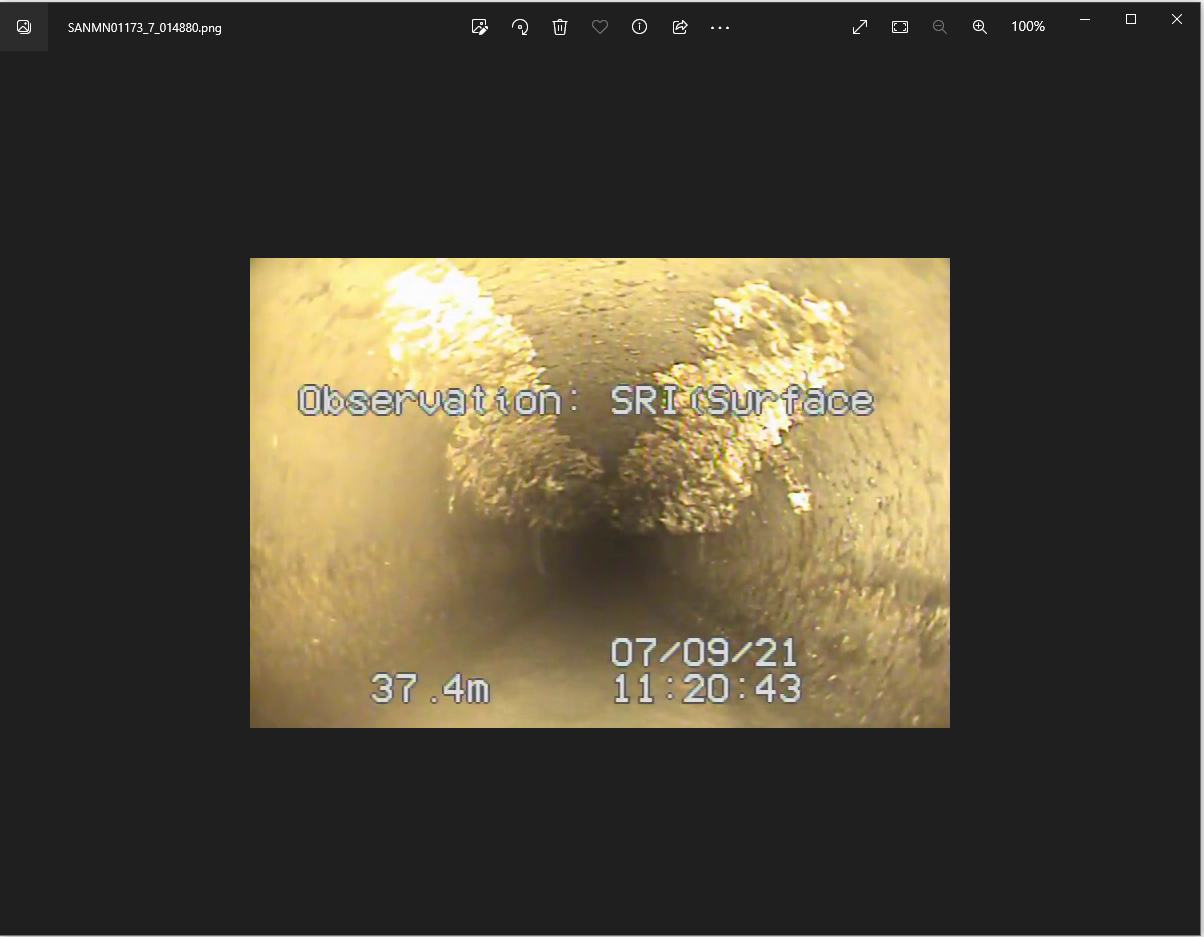
In SANMNO1173, the inspector annotated the defect as Surface Roughness Increased (SRI). However, the reviewer changed it to Deposit Attached Grease (DAGS). From the training, the white substance can be seen as deposits attached grease. There is also a sign of rock exposing along the wall suggesting surface roughness increased. I decided to go with PACP code in Access Database as the defect is labeled as a continuous defect.
For the continuous defect, there is a starting distance (denoted by S) and finishing distance (denoted by F). We should only label the continuous defect on images with distance [starting distance, finishing distance) (exclude the finishing distance). Drop frame at distance equal to finishing distance.
- Frame at the finishing distance = 41.7
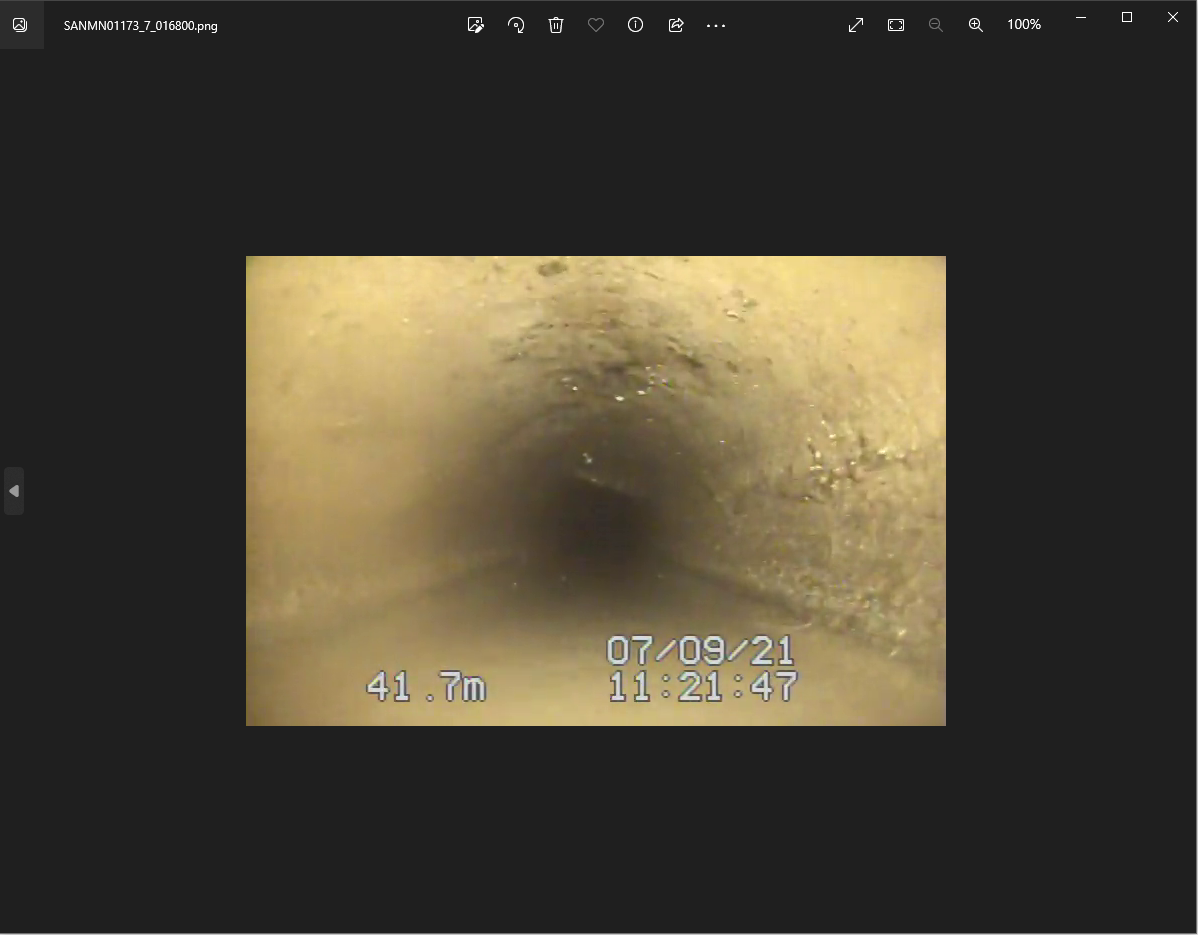
- One Frame before the finishing distance
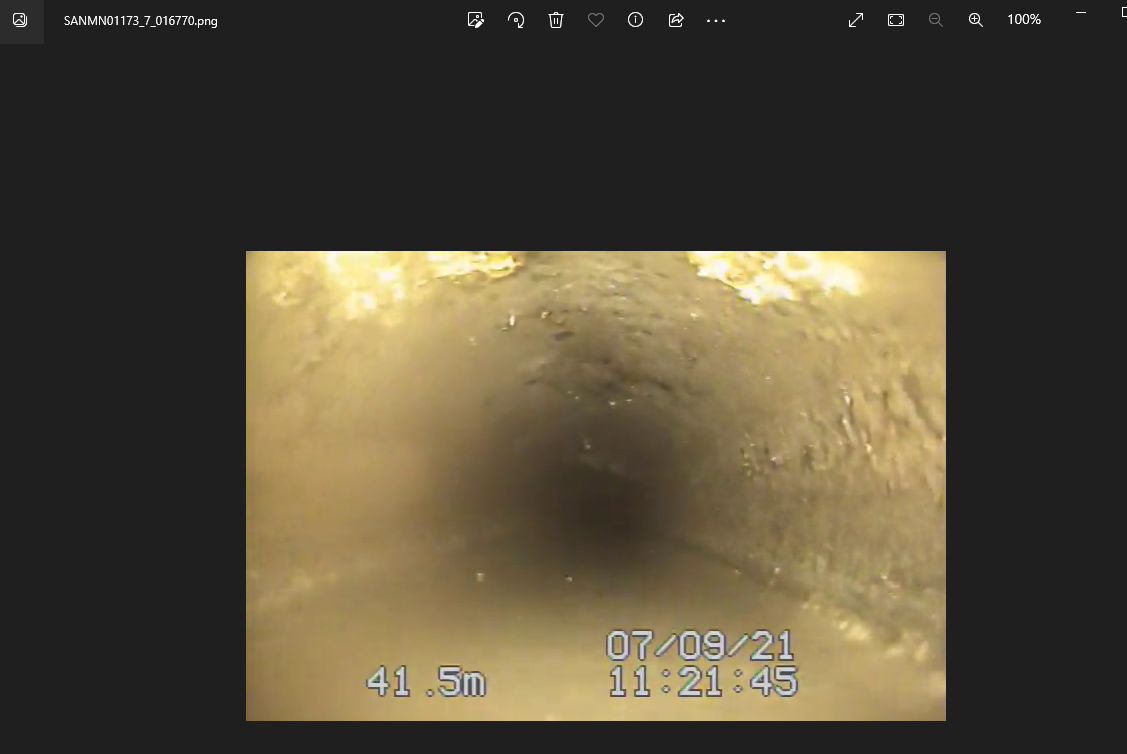
- Frame at the finishing distance = 41.7
Need to add code to drop any image 1 m located from the start of continuous defect.
- Before I put the start of continuous defect as part of list of point defect. However, the defect code will be removed from the list if the distance is not found in the list of frame. The code is meant for point defect code and not continuous code.
Sometime the distance of defect annotated in the video is off by 1 decimal place to the distance input in access database. Need a code to deal with this so that it does not see as a different defect and drop the video annotated defect. (Found the problem in SANMN05099_50 video)
In some videos there is a glitch in the distance value.Therefore, some frame we are having an decreasing in distance. Should get rid of function to replace any decreasing distance with nan. The issue also presents in the current image labelling implementation using the annotation from the videos.(Found the problem in SANMN05283_51 and SANMN05390_52 video).
- We can fix problem by getting rid of the function that replace any decreasing distance with nan
- drop frames within 1 m distance before the point defect and at the start of continuous defect and any frames located between frames with that has distance = defect distance -1m and frame with defect labels to ensure that those frames would not be labeled as ND if they are located near defect points.
The counter distance of the defect and the distance of frame with defect are off by 0.1 or 0.2. Add the meter_dist_after=0.2 argument to assign_label_high_spatial_correlation and assign_label_high_spatial_correlation_access_version functions. (problem found in SANMN05731_69)
In SANMN05731_69 there are two TB and DAGS at 51.6 m. The labels column = TB TB DAGS. This should be change to TB DAGS. This is not an issue when doing image labelling according to annotation in the video.
Access Data vs Annotation from videos
Video SANMN00834_10.mp4
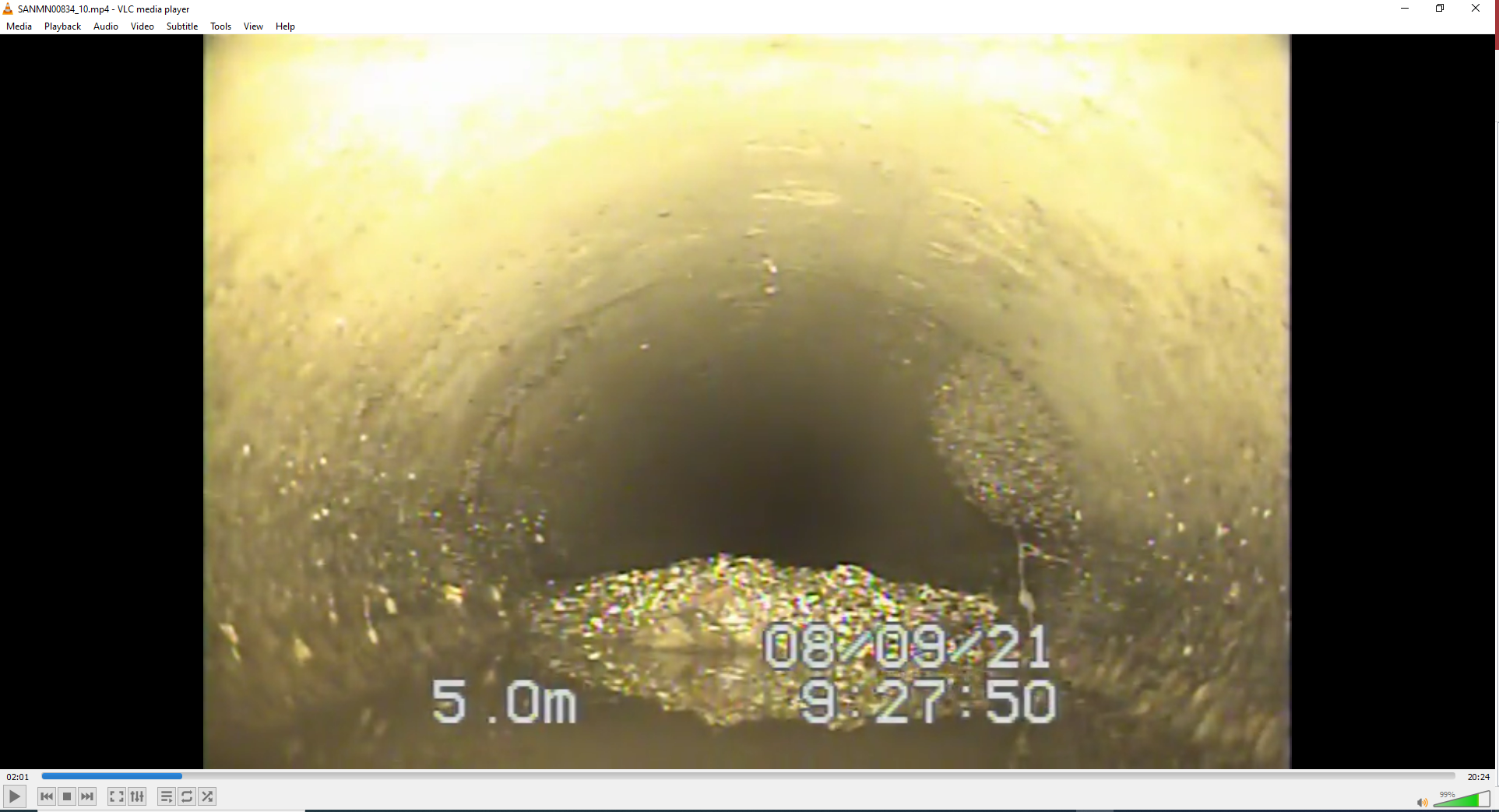
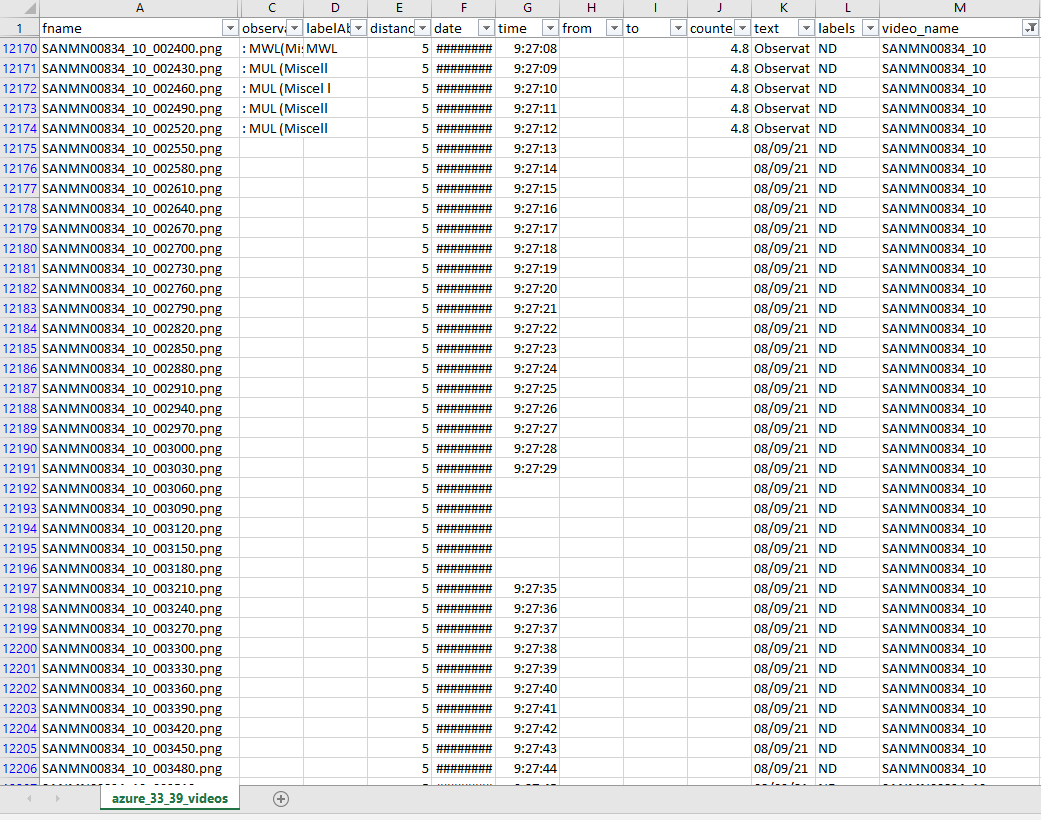
There are two defects at 5 m:
- Root Fine Ball (RFB)
- Circumferential crack (CC) However, there is no annotation on the video. The two defects were annotated in access database
Image at 5m
Access Database
Labels from Azure at 5m
Clean up Access Data
Some video filename and the name is the access database are not the same.
- Create a list of unique video filename
- Create a list of unique video filename inside access database
- Create a list of sewer pipe id
Concern regarding doing 75-15-10 split randomly
When doing the random split, the defect images that used for training, validation, and testing are likely to be the same especially for defect class that can be found in one video.
For example, FC (Circumferential Fracture) can only be found in SANMN00868_27. Out of 47 frames (which are likely to look similar), 35 images were used for training, 8 were used for validation, and 4 were used for testing. My concern is we won't get a robust model (general model) if we are using those 4 frames to get F1 score / F2 score for FC because those 8 frames are so similar to frames that we used for training and validtion.


Example of images using in training, validation and testing
- One of 35 images with label = FC for training (SANMN00868_27_006810.png)
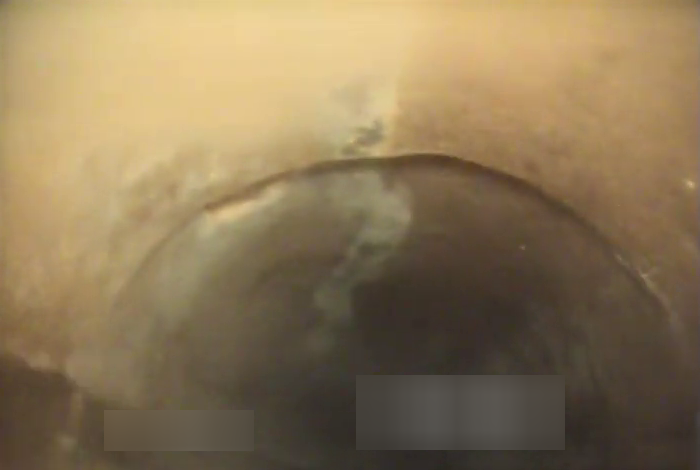
- One of 8 images with label = FC for validation (SANMN00868_27_007170.png)
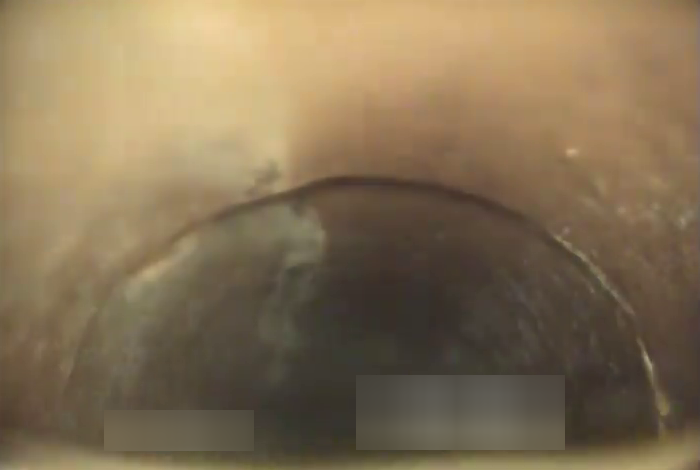
- One of 4 images with label = FC for testing (SANMN00868_27_007080.png)
List of combination of defects that found in only one video
| video_name | labels | number_frame | location |
|---|---|---|---|
| SANMN00893_1 | TB RFL | 122 | train |
| SANMN00893_1 | TB RFL | 28 | val |
| SANMN00893_1 | TB RFL | 21 | test |
| SANMN01000_5 | OBN | 94 | train |
| SANMN01000_5 | OBN | 20 | val |
| SANMN01000_5 | OBN | 17 | test |
| SANMN04267_76 | JOM | 130 | train |
| SANMN04267_76 | JOM | 24 | val |
| SANMN04267_76 | JOM | 24 | test |
| SANMN08088_48 | TBI | 38 | train |
| SANMN08088_48 | TBI | 6 | val |
| SANMN08088_48 | TBI | 7 | test |
| SANMN04377_63 | DAE IDJ | 75 | train |
| SANMN04377_63 | DAE IDJ | 21 | val |
| SANMN04377_63 | DAE IDJ | 13 | test |
| SANMN05724_55 | TB OBR | 18 | train |
| SANMN05724_55 | TB OBR | 3 | val |
| SANMN05724_55 | TB OBR | 2 | test |
| SANMN07901_47 | TB DAE | 52 | train |
| SANMN07901_47 | TB DAE | 12 | val |
| SANMN07901_47 | TB DAE | 8 | test |
| SANMN00868_27 | FC | 35 | train |
| SANMN00868_27 | FC | 8 | val |
| SANMN00868_27 | FC | 4 | test |
| SANMN04953_49 | TB TBC | 9 | train |
| SANMN04953_49 | TB TBC | 2 | val |
| SANMN04953_49 | TB TBC | 1 | test |
| SANMN04254_44 | LD AOC | 66 | train |
| SANMN04254_44 | LD AOC | 13 | val |
| SANMN04254_44 | LD AOC | 9 | test |
| SANMN86600_4 | SAV | 56 | train |
| SANMN86600_4 | SAV | 14 | val |
| SANMN86600_4 | SAV | 10 | test |
| SANMN03959_70 | FM | 36 | train |
| SANMN03959_70 | FM | 12 | val |
| SANMN03959_70 | FM | 5 | test |
| SANMN05502_60 | DAE IRJ | 34 | train |
| SANMN05502_60 | DAE IRJ | 5 | val |
| SANMN05502_60 | DAE IRJ | 3 | test |
| SANMN03805_43 | OBJ | 100 | train |
| SANMN03805_43 | OBJ | 18 | val |
| SANMN03805_43 | OBJ | 15 | test |
| SANMN03805_43 | ISGT | 99 | train |
| SANMN03805_43 | ISGT | 17 | val |
| SANMN03805_43 | ISGT | 15 | test |
| SANMN05724_55 | TBC | 74 | train |
| SANMN05724_55 | TBC | 16 | val |
| SANMN05724_55 | TBC | 7 | test |
| SANMN03005_17 | LR MMC | 91 | train |
| SANMN03005_17 | LR MMC | 13 | val |
| SANMN03005_17 | LR MMC | 10 | test |
| SANMN08142_46 | CS | 37 | train |
| SANMN08142_46 | CS | 4 | val |
| SANMN08142_46 | CS | 1 | test |
| SANMN02808_38 | LR | 50 | train |
| SANMN02808_38 | LR | 10 | val |
| SANMN02808_38 | LR | 5 | test |
| SANMN05099_50 | B | 2 | train |
| SANMN05099_50 | B | 0 | val |
| SANMN05099_50 | B | 0 | test |
Distribution of each defect class for run 33 (33 videos + 39 videos)
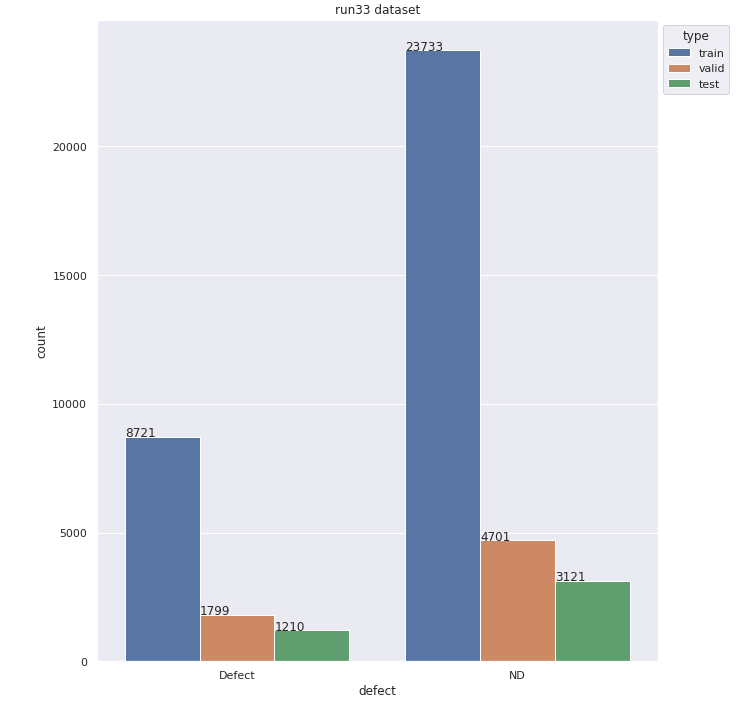
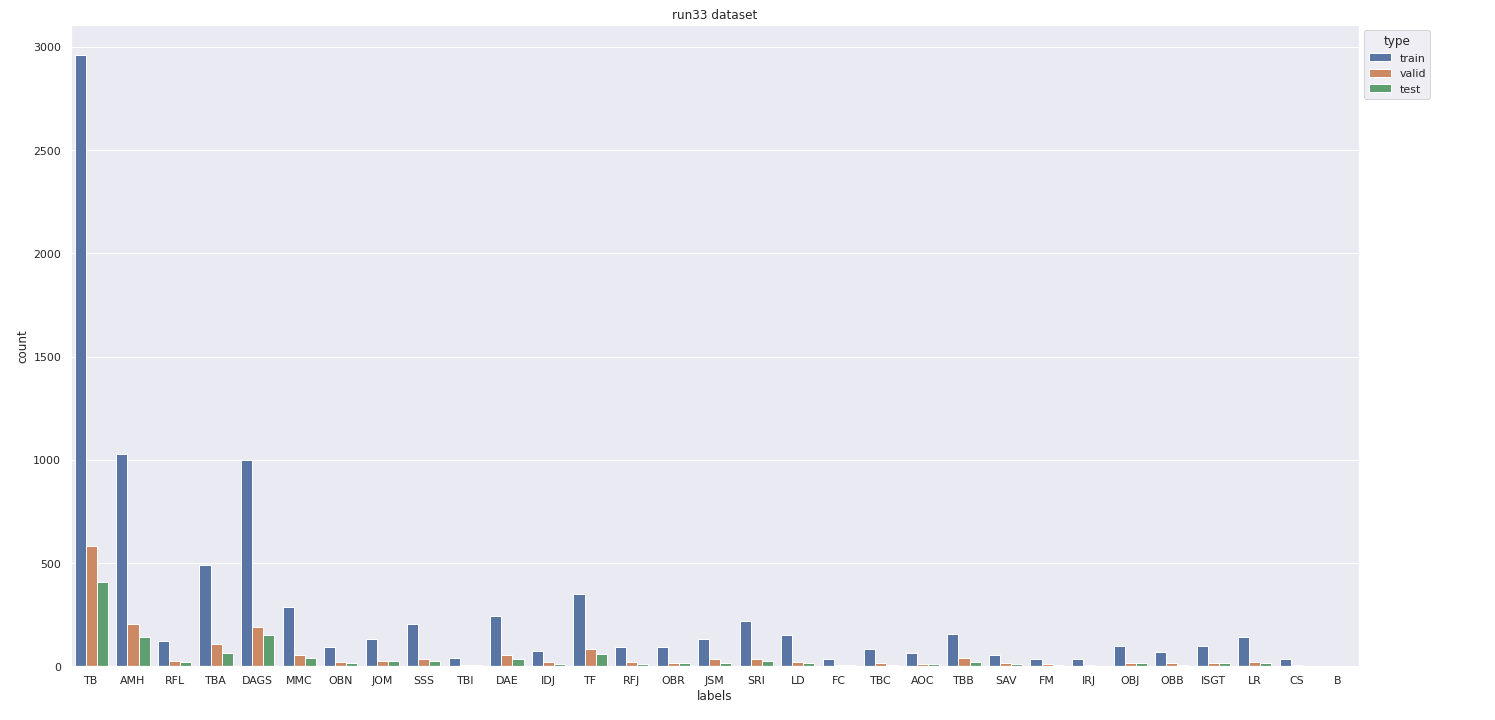
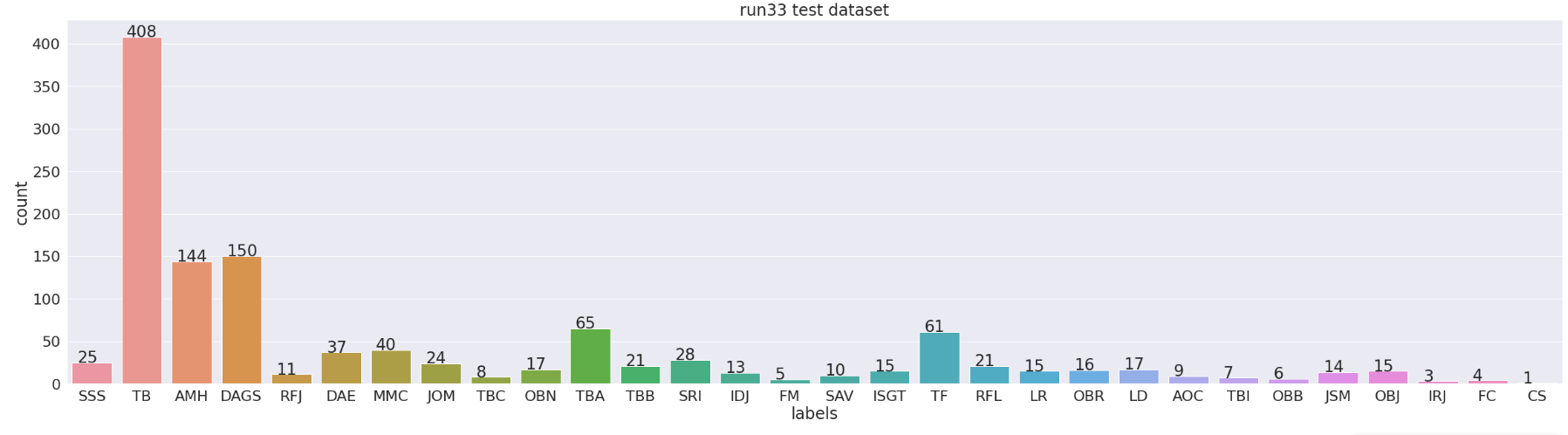
Class distribution: Access Database vs Video Annotation
The table below shows the number of images of each defect when using access database or the annotation in the videos as the labelling method.
| Class | Access database | Video annotation |
|---|---|---|
| AMH | 1744 | 1377 |
| AOC | 141 | 88 |
| BSV/B | 220 | 2 |
| CC | 5 | - |
| CS | 43 | 42 |
| DAE | 419 | 336 |
| DAGS | 7976 | 1341 |
| FC | 47 | 47 |
| FM | 54 | 53 |
| IDJ | 57 | 109 |
| IRJ | 106 | 42 |
| ISGT | 181 | 131 |
| ISJ | 3 | - |
| JOM | 178 | 178 |
| JSM | 180 | 179 |
| LD | 191 | 190 |
| LR | 183 | 179 |
| MMC | 579 | 381 |
| ND | 23824 | 31717 |
| OBB | 92 | 92 |
| OBJ | 133 | 133 |
| OBN | 131 | 131 |
| OBR | 129 | 127 |
| RFB | 5 | - |
| RFJ | 211 | 129 |
| RFL | 171 | 171 |
| RMB | 68 | - |
| SAV | 81 | 80 |
| SCP | 57 | - |
| SRI | 205 | 284 |
| SSS | 298 | 263 |
| SZ | 230 | - |
| TB | 3561 | 3949 |
| TBA | 421 | 663 |
| TBB | 149 | 218 |
| TBC | - | 109 |
| TBI | 52 | 51 |
| TF | 1680 | 493 |
| TFA | 251 | - |
| TFC | 158 | - |
| Total | 44214 | 43285 |
Suggestions
- Manually set aside videos for testing. The videos that were set for testing should be the videos of pipe material that can be found in more than one video and contain the defect class that found in more than one video
- One PACP code is comprised of a combination of a Group (always), Descriptor(sometime) and Modifier (sometime)
- For example RFJ, Root (group) Fine (descriptor) Joint (modifier)
- To increase number of image in each class, we can label images based on Group only.
- Disadvantage we cannot get the LoF of the pipe correctly we label images based on Group only because for an example RFJ and RMJ will have different LoF according to PACP